Asking from the page
You do not have to type in the chat to ask for a change. A right-click in the page sends Claude a request, and the page shows what became of it. This page explains what a request carries, how it reaches Claude and how to read the Requests list.
Right-click to ask
Right-click anything in the page. A small box opens: type your request, press Enter to send it. The request carries what you pointed at, so you can say what you want and leave out the where. See The page and its views for the keys of the Ask box.
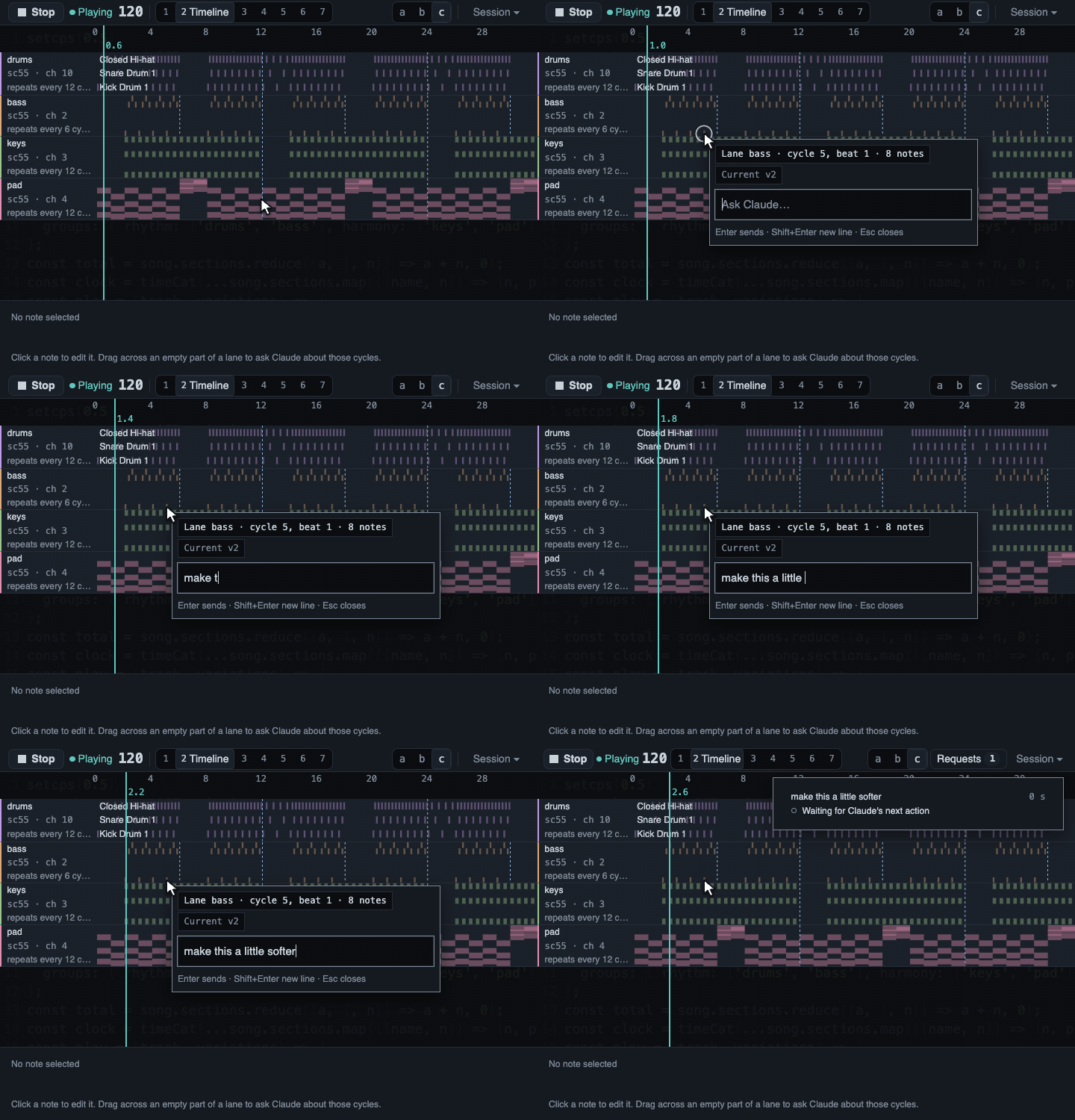
A request is always kept, but Claude only sees it at once when page requests are Live. Claude usually starts the monitor itself after one of its replies from Moontide. If the Session drawer says Waiting, turn them on, or the request waits for Claude's next action in Moontide.
On the Timeline, a right-click also sends the moment under the pointer:
- the cycle and the beat;
- the version that was playing;
- the notes that sound there or start in the same sixteenth of the bar, with their velocities and, for a MIDI track, its instrument and channel.
A right-click on a section, a track, a cell or a group of the Song grid asks about that thing. A failed change can be asked about too: the banner has an Ask Claude button that carries the error.
Live or waiting
Claude has to notice a request without you typing in the chat. The Session drawer says how requests reach it, in its Page requests card:
- Live: Claude runs a small helper called a monitor. Each request reaches Claude at once.
- Waiting for Claude: nothing runs in the background. A request reaches Claude with its next action in Moontide, for example its next change to the music.
The (i) next to the state explains how to switch. Page requests need an open page, so start Moontide first.
Turn them on or off
In the Code tab of the Claude app, ask Claude to turn page requests on or off. Claude calls Moontide's set_page_requests tool.
In Claude Code in a terminal, type one of these:
/mcp__moontide__page-requests-onmakes them live./mcp__moontide__page-requests-offmakes them wait.
These names assume you added Moontide under the name moontide, as the Install page does. Off holds until you turn them on again. A request sent while they wait is not lost: it arrives with Claude's next action.
The monitor and its permission
A live monitor lasts at most 30 minutes. Claude starts it again when a reply from Moontide asks it to.
Claude Code asks your permission before it starts the monitor, because it runs a command. You can approve it each time. If you want a narrower permission rule instead, see the permissions section of the Claude Code documentation. Do not allow broad node commands: a rule that wide lets Claude run any script.
The Requests list
The Requests button in the top bar appears after you send your first request. It counts the requests still in flight and opens a list with one row for each request: what happened to it and how long ago.
A request goes through these states, in the page's own words:
- Sent, then Waiting for Claude's next action or Received.
- Claude has started on it. This means Claude made a call to Moontide after the request arrived. It does not promise that a change will follow.
- Waiting for its line. Claude's change is ready and waits for the next bar or phrase.
- Applied as v12. The change is in the History view as that version.
- Failed with the error, when the change could not play.
- Replaced by a newer change or Canceled, when a newer change took its place or Stop ended the wait.
- Answered or Declined, with Claude's sentence, when Claude answers in words and changes no music.
- Not sent, with the reason, when the page could not send it.
- Connection lost, when the page lost its link to Moontide and cannot tell what happened.
A request shows as applied only when Claude names it with its change. The page never guesses a link from timing, so a change that happens to follow your request says nothing about it.
After 30 seconds without news, a row reads No change yet and keeps counting. That is not a failure: Claude may still be working, or it may not have seen the request. The page does not guess.
Click a row to see the whole request and what its state means. Finished rows move to a short Recent list after 30 seconds. Nothing is kept after Moontide stops: the rows live in memory only, and your request text never reaches the disk.
What was verified
Verified:
- The path of a request, from the right-click to Claude and back, and each state of the list are covered by automated tests and by a drive of the real page in headless Chrome.
- Before the states shipped, fresh Claude sessions were each given one plain request from the real page, with no hint about ids or tools. In every session whose request changed the music, Claude named the request with its change, and in every session whose request needed only an answer, Claude closed it in words. The bar was four out of five for each kind, and it was met.
Not verified:
- Whether the request states read well in a short real session: plain, honest wording, and whether "started" can be trusted.
- How the Requests list opens on a send and folds after the last finish at 1080p and at 4K, in each layout.
- Whether a screen reader says the states right.
- The commands for the monitor on Windows and Linux.